

GLO-216Y/G Programmer's Reference
This page describes the GLO-216's fonts and instruction set. For hookup, configuration and specifications, please see the hardware reference.
Version 2.0: The upgrade guide describes differences between v1 and v2. New instructions are included in the Escape section of this page and marked v2.
Table of Contents
Serial Communication
GLO-216s accept asynchronous serial at 9600bps, 8 data bits, no parity, 1 or more stop bit(s), often called "N81." They will accept RS-232 input, inverted TTL, or non-inverted TTL. Non-inverted TTL requires cutting the SPol jumper on the circuit board. See the hardware reference for further information.
Character Set
GLO-216s display the standard ASCII character set for character codes 32 to 127 (0x20-0x7F hex). Character codes 128-143 (0x80-0x8F hex), the last row in the chart below, are custom characters that can redefined and saved to EEPROM using Escape instructions.
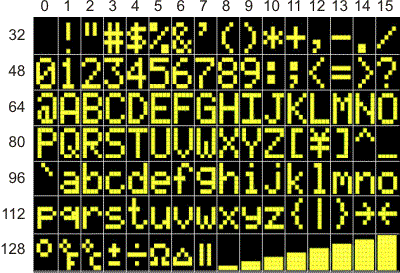
Character Set (Character code= row+column)
Last row, 128-143, is the default custom-character set.
Screen Layouts
GLO-216 offers four font sizes, which can be freely mixed on the screen. The following screen layouts show position values for the various font sizes. Positioning (ctrl-P below) is in terms of the font-size in effect at the time.
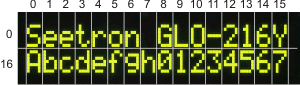
Default 2x16 Screen Layout
Position=row+column.
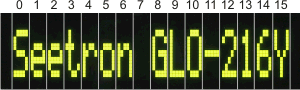
Tall-character, 1x16 Screen Layout
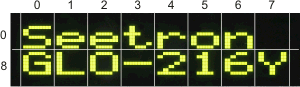
Wide-character, 2x8 Screen Layout
Position=row+column.
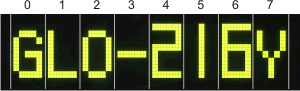
Large-character, 1x8 Screen Layout
(7-segment numbers)
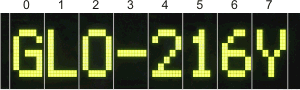
Large-character, 1x8 Screen Layout
(text-style numbers)
Control Codes
GLO-216s understand a small set of control codes modeled on those used by our BPP, VFD, ILM, TRM and SGX products, but with OLED-specific tweaks. Here's a list of quick descriptions. Codes not listed below (e.g., Null, 0) are ignored by the display.
Items marked with » can be clicked for tips or more detail.
Home (ctrl-A) 01 dec 0x01 hex
Moves the printing position to 0, the first character of the top line. »
Select Font Size (ctrl-B) 02 dec 0x02 hex
Cycles the font size, normal→tall→wide→big→normal... »
Set Font Size to Normal (ctrl-C) 03 dec 0x03 hex
Sets the font to the default, small size (two lines of 16 characters. »
Backspace (ctrl-H) 08 dec 0x08 hex
Backs up one character, erases that character, sets the print position to erased character's location. »
Tab (ctrl-I) 09 dec 0x09 hex
Moves the printing position to the next multiple-of-4 screen location: 0→4→8→12→16→20→24→28→0... »
Smart Linefeed (ctrl-J) 10 dec 0x0A hex
Moves the printing position down a line. »
Vertical Tab (ctrl-K) 11 dec 0x0B hex
Moves the printing position up a line. »
Clear Screen (ctrl-L) 12 dec 0x0C hex
Clears the screen and moves the printing position to 0—the first position of the first line. »
Carriage Return (ctrl-M) 13 dec 0x0D hex
Moves to the first printing position of the next line. »
Turn On OLED driver (ctrl-N) 14 dec 0x0E hex
Turns on the OLED driver circuitry after a previous ctrl-O turned it off. »
Turn Off OLED driver (ctrl-O) 15 dec 0x0F hex
Turns off the OLED driver circuitry to save power. »
Set Printing Position (ctrl-P) 16 dec 0x10 hex
Sets the printing position according to the value of the next byte, position+64 (0x40 hex). »
Right-align Text (ctrl-R) 18 dec 0x12 hex
Displays text (usually numeric) within a field 2 to 8 characters wide. The byte that follows ctrl-R is a text number from '2' to '8' (50-56 dec, 0x32-0x38 hex) that sets the field width. The text after that will be invisibly stored until one of the following is received:
- A control code.
- A period/decimal point.
- The specified number of bytes.
When this happens, the field will be cleared and the received text printed at the righthand end of the field. »
Set 7-Segment Big Numbers (ctrl-S) 19 dec 0x13 hex
Sets 7-segment-style bitmaps for numbers displayed at the largest font size (default).»
Set Text-style Big Numbers (ctrl-T) 20 dec 0x14 hex
Sets normal text patterns for numbers displayed at the largest font size.»
Escape: Start Multipart Instruction (ctrl-[) 27 dec 0x1B hex
See the Escape-code descriptions below.
BPI/BPK Instruction Prefix (NA) 254 dec 0xFE hex
See BPI Upgrade Guide.
Escape Instructions
These are multipart instructions that begin with the Escape character; 27 dec, 0x1B hex. Escape instructions affect memory: writing bitmaps to RAM to define custom characters, or storing/recalling text or character patterns to/from EEPROM.
Define Custom Character Pattern ESC D n B0 B1 B2 B3 B4 B5 B6 B7
Change the pattern of custom character n to the bitmap made up of bytes B0 through B7. The value n is a text number '0' to '7' (48-55 dec, 0x30-0x37 hex) specifying the custom character to be defined.
The figure below shows how the bits of bytes B0 through B7 define the shape of the custom character. The upper three bits of the pattern bytes are ignored. A tool for calculating custom-character bytes is online at seetron.com.
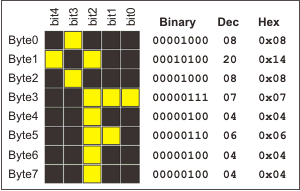
Bitmap Layout for Custom Characters.
GLO-216 supports 16 custom characters, double the 8 allowed by LCDs. To maintain backward compatibility, the lower 8 characters are defined by ESC D (uppercase D; 68 dec, 0x44 hex) and the upper set by ESC d (lowercase d; 100 dec, 0x64 hex). The custom characters map to character codes 128-143 dec (0x80-0x8F hex) as shown in the character chart above.
An example: To define custom-character 3 (which maps to character code 131) to the °F pattern in the example above, you'd send the sequence of 11 bytes shown below. To define custom character 10 (maps to char code 138) instead, you would substitute 100 dec/0x64 hex (lowercase d) for 68 dec/0x44 hex (uppercase D).
| ESC | D | '3' | B0 | B1 | B2 | B3 | B4 | B5 | B6 | B7 | |
|---|---|---|---|---|---|---|---|---|---|---|---|
| Dec: | 27 | 68 | 51 | 8 | 20 | 8 | 7 | 4 | 6 | 4 | 4 |
| Hex: | 0x1B | 0x44 | 0x33 | 0x08 | 0x14 | 0x08 | 0x07 | 0x04 | 0x06 | 0x04 | 0x04 |
Custom Characters: GLO versus LCD
GLO-216 allows redefinition of custom characters without altering custom characters already on the screen. This is a significant change from LCD custom-character behavior. »
Recall Saved Data (text or custom characters) from EEPROM ESC E 0
Recall stored data from EEPROM. ESC E (uppercase E; 69 dec, 0x45 hex) 0 (zero; 48 dec, 0x30 hex) recalls the saved startup text to the screen. The same instruction with lowercase e (101 dec, 0x65 hex) recalls the saved custom-character set from EEPROM (without affecting the screen). »
Store Data (text or custom characters) to EEPROM ESC X 0
Store data to EEPROM. ESC X (uppercase X; 88 dec, 0x58 hex) 0 (zero; 48 dec, 0x30 hex) saves all text and instructions received since the last ctrl-L clear-screen. The same instruction with lowercase x (120 dec, 0x78 hex) saves the current custom-character set.
These instructions can be disabled in order to protect the data from accidental changes by cutting the DSU (display setup) jumper on the interface pcb.
Startup Screen Usage and Write Protection
ESC X 0 should be used as a pre-installation configuration step, not during normal operation. Once the startup screen is properly configured, the DSU jumper should be cut to prevent accidental rewrite/erasure. This is especially important since the the startup screen can contain instructions that affect the display's operation. If a temporary glitch wrote random instructions to the startup sequence, those erroneous instructions would be executed every time the display was subsequently powered up.
Additional Info on ESC X 0 (Store Text)
The basic purpose of ESC X 0 is to store a string of text that will be used at startup to display a splash screen, like the default model/version screen. But ESC X 0 can store instructions too, up to a total of 48 bytes. The only instruction it will not store is clear-screen, which it uses as a start marker. Why allow embedded instructions? It lets you set defaults (e.g., font size, or initial printing position) that will be in effect as soon as the display powers up, or anytime an ESC E 0 is sent.
The flexible nature of this mechanism means that you may get unexpected results when you recall the stored text/data; for example, if the screen is not cleared beforehand, or if a different font size is in effect.
Set OLED Brightness ESC n
ESC n sets the brightness of the backlight in five steps from 0% to 100%. The value of n is specified by the printable numbers "0" to "4" (48-52 dec, 0x30-0x34 hex ). Sending ESC 2 (27 50 dec, 0x1B 0x32 hex) sets 50% brightness.
This instruction is available in version 2.0 (and higher).
Long Escape Instructions (Version 2.0)
Version 2.0 adds Escape instructions that reconfigure the GLO-216 on-the-fly. To avoid accidental triggering, they use long (8-character), case-sensitive codes, prefaced by ESC ! (27 33 dec, 0x1b 0x21 hex). All of these instructions except ESC !ResetNow and ESC !FlshLock can be embedded in a startup screen for permanent-until-erased/replaced configuration. (If not embedded in a startup screen, these instructions remain in effect until the power is turned off.)
Immediate Reset ESC !ResetNow
Reset the display to initial power-on state. During reset, the GLO will be unable to receive serial data for approximately 200ms.
This instruction cannot be embedded in the startup screen.
| ESC | ! | R | e | s | e | t | N | o | w | |
|---|---|---|---|---|---|---|---|---|---|---|
| Dec: | 27 | 33 | 82 | 101 | 115 | 101 | 116 | 78 | 111 | 119 |
| Hex: | 0x1B | 0x21 | 0x52 | 0x65 | 0x73 | 0x65 | 0x74 | 0x4E | 0x6F | 0x77 |
Flip Screen ESC !FlipScrn
Flip the screen image vertically.
Setting remains in effect until next power off (unless instruction is embedded in startup screen).
| ESC | ! | F | l | i | p | S | c | r | n | |
|---|---|---|---|---|---|---|---|---|---|---|
| Dec: | 27 | 33 | 70 | 108 | 105 | 112 | 83 | 99 | 114 | 110 |
| Hex: | 0x1B | 0x21 | 0x46 | 0x6C | 0x69 | 0x70 | 0x53 | 0x63 | 0x72 | 0x6E |
Normal and flipped screen orientation are relative to the 16-pin connector at the top/left of the display:
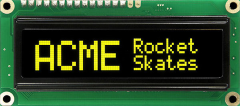 |
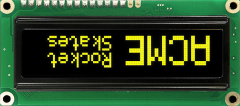 |
| Normal/Unflipped | Flipped |
|---|
Undo Flip Screen ESC !UnFlipSc
Restore normal screen orientation.
Setting remains in effect until next power off (unless instruction is embedded in startup screen).
| ESC | ! | U | n | F | l | i | p | S | c | |
|---|---|---|---|---|---|---|---|---|---|---|
| Dec: | 27 | 33 | 85 | 110 | 70 | 108 | 105 | 112 | 83 | 99 |
| Hex: | 0x1B | 0x21 | 0x55 | 0x6E | 0x46 | 0x6C | 0x69 | 0x70 | 0x53 | 0x63 |
Write-Protect Flash Memory ESC !FlshLock
Temporarily write-protect flash memory. (For permanent write-protection, cut the Dsu jumper.)
Setting remains in effect until next power off. This instruction cannot be embedded in a startup screen, because it would prevent the screen from being saved to flash.
| ESC | ! | F | l | s | h | L | o | c | k | |
|---|---|---|---|---|---|---|---|---|---|---|
| Dec: | 27 | 33 | 70 | 108 | 115 | 104 | 76 | 111 | 99 | 107 |
| Hex: | 0x1B | 0x21 | 0x46 | 0x6C | 0x73 | 0x68 | 0x4C | 0x6F | 0x63 | 0x6B |
Set Inline Carriage Return ESC !InlineCR
Change the carriage return (ctrl-M) behavior to move to the beginning of the current line of the display. (Default CR moves to the beginning of the next line.)
Setting remains in effect until next power off (unless instruction is embedded in startup screen).
| ESC | ! | I | n | l | i | n | e | C | R | |
|---|---|---|---|---|---|---|---|---|---|---|
| Dec: | 27 | 33 | 73 | 110 | 108 | 105 | 110 | 101 | 67 | 82 |
| Hex: | 0x1B | 0x21 | 0x49 | 0x6E | 0x6C | 0x69 | 0x6E | 0x65 | 0x43 | 0x52 |
Set Data Rate (baud) ESC !9600_bps ESC !19.2kbps ESC !38.4kbps
Set the serial data rate to the specified value. Rate remains in effect until power off. At next power on, the data rate will return to default (9600) or to the rate specified by embedding one of these instructions in the startup screen.
| ESC | ! | 9 | 6 | 0 | 0 | _ | b | p | s | |
|---|---|---|---|---|---|---|---|---|---|---|
| Dec: | 27 | 33 | 57 | 54 | 48 | 48 | 95 | 98 | 112 | 115 |
| Hex: | 0x1B | 0x21 | 0x39 | 0x36 | 0x30 | 0x30 | 0x5F | 0x62 | 0x70 | 0x73 |
| ESC | ! | 1 | 9 | . | 2 | k | b | p | s | |
|---|---|---|---|---|---|---|---|---|---|---|
| Dec: | 27 | 33 | 49 | 57 | 46 | 50 | 107 | 98 | 112 | 115 |
| Hex: | 0x1B | 0x21 | 0x31 | 0x39 | 0x2E | 0x32 | 0x6B | 0x62 | 0x70 | 0x73 |
| ESC | ! | 3 | 8 | . | 4 | k | b | p | s | |
|---|---|---|---|---|---|---|---|---|---|---|
| Dec: | 27 | 33 | 51 | 56 | 46 | 52 | 107 | 98 | 112 | 115 |
| Hex: | 0x1B | 0x21 | 0x33 | 0x38 | 0x2E | 0x34 | 0x6B | 0x62 | 0x70 | 0x73 |